| |
 |
|
| |
COBOL TUTORIAL
FOR BCA STUDENTS OF M G UNIVERSITY |
|
| |
|
|
| |
|
|
| |
|
| |
|
| |
Editing is normally performed by moving a numeric
data item to a field containing special editing characters
in its PICTURE clause.
The following characters can be used in the PICTURE
clause to indicate editing:
Z * $ - + CR DB . , B O /
The use of these edit characters are explained below:
|
|
| |
|
| |
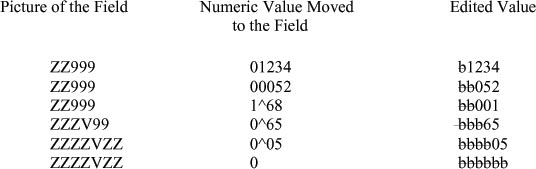
The edit character Z is used to suppress the leading
zeroes in the numeric data item. The leading zeroes
are replaced with blanks. Z character has no effect
of trailing zeroes.
Examples:
The following examples illustrate the use of Z editing
characters. The character  is used to indicate a space character and the character
^ is used to indicate the position of the decimal
point.
is used to indicate a space character and the character
^ is used to indicate the position of the decimal
point.
|
|
| |
|
|
| |
|
| |
The edit character * (asterisk) is identical to Z
except that the leading zeros are replaced by asterisks
instead of space characters.
Examples:
|
|
| |
|
| |
|
| |
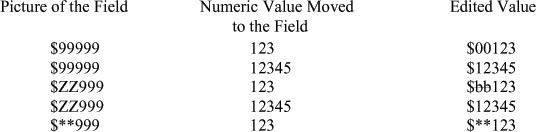
A single currency sign can appear at the leftmost
position of a picture. In that case the $
character is inserted.
Examples:.
|
|
| |
|
| |
|
| |
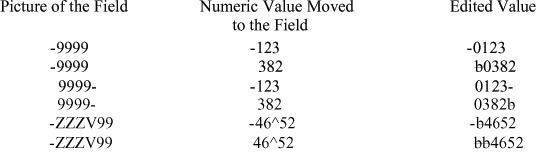
A minus sign can appear either at the leftmost or
rightmost position of a picture. If an item is negative,
a minus sign will be inserted in the said position.
On the other hand, if the item is positive, a space
character will be inserted.
Examples:
|
|
| |
|
|
| |
|
|
| |
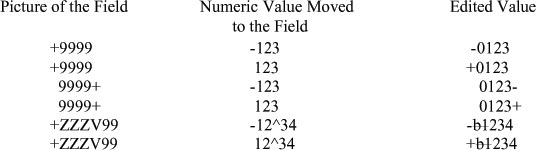
A plus sign is similar to minus sign except that when
the item is positive, +sign will be inserted instead
of the space character. If the item happens to be
negative, a minus sign will be inserted although there
is a plus sign in the picture.
Examples:
|
|
| |
|
|
| |
|
| |
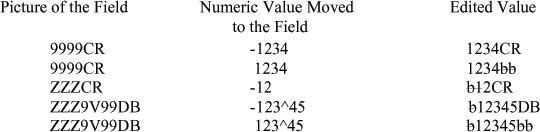
The two characters CR or DB symbol may appear only
at the rightmost position of the picture. They are
identical to the minus sign edit character. In other
words, the symbols CR or DB will appear in the rightmost
position only if the item is negative, otherwise they
will be replaced by two space characters.
Examples:
|
|
| |
|
|
| |
|
| |
A period may be used to insert a decimal point and
may not appear more than once. Both the period and
V cannot appear in the same picture. A period must
not also appear as the rightmost character in the
picture.
Examples:
|
|
| |

|
|
| |
|
| |
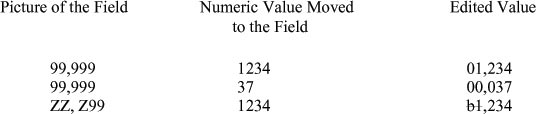
A comma, when used in a picture, is treated as an
insertion character and inserted wherever it appears.
There can be more than one comma in a picture.
Examples:
|
|
| |
|
|
| |
|
| |
The appearance of a B anywhere in the picture will
insert a space character in the edited data. There
can be more than one B in a picture.
Examples:
|
|
| |

|
|
| |
|
| |
A zero appearing in a picture will be treated in the
same way as a B except that 0 will be inserted instead
of a space character.
Examples:
|
|
| |

|
|
| |
|
| |
The edit character slash (/) also called virgule or
stroke, may appear anywhere in the picture. If used,
it will be inserted. There can be more than one slash
in the picture.
Examples:
|
|
| |

|
|
| |
|
| |
BLANK WHEN ZERO is an editing clause which may be
used along with a picture. This will set the entire
data item to blanks of its value is equal to zero.
However, the edit character asterisk (*) may not be
used if BLANK WHEN ZERO is specified. When this clause
is used to describe a field whose picture contains
an asterisk, it is ignored by the compiler. The syntax
of this clause is as follows:
BLANK WHEN ZERO
Examples:
|
|
| |

|
|
| |
|
| |
The currency symbol ($) can appear in multiples on
the left-hand side of a picture. In this case the
character will be treated in the same way as the Z
character and only one currency symbol will be inserted
immediately to the left of the first non-zero digit
of the data. Such a floating insertion is also possible
in the case of minus (-) and plus (+) signs. In the
case of the minus character, no sign will be inserted
unless the data is negative. The appearance of a period
halts the floating insertion.
Examples:
|
|
| |
 |
|
| |
|
|
| |
|
|
| |
|
|
| |
|
|
| |
|
|