| |
| |
 |
|
| |
COBOL TUTORIAL
FOR BCA STUDENTS OF M G UNIVERSITY |
|
| |
|
|
| |
|
|
| |
|
| |
|
| |
COBOL makes use of level number concept to describe
the hierarchical data structure. A level number is
a 2 digit number. The allowed level numbers are 01
– 49, 66, 77 and 88. All variables are declared
in the working-storage section using appropriate level
numbers.
An elementary data item can take either 01 or 77 as
its level number.
In COBOL a distinction is made between elementary
and group data items. A few elementary data may be
combined to form a group.
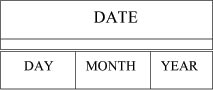
For example: DAY, MONTH and YEAR may be three elementary
data items. These may be combined to form a group
data named DATE. The organization may be shown
pictorially as follows:
|
|
| |
 |
|
| |
It may be noted that the memory space referred to
by DATE is the combined memory space for DAY, MONTH
and YEAR. The advantage of such a grouping is obvious.
The programmer can now refer to the individual elementary
items DAY, MONTH, YEAR or to the group item DATE.
An elementary data item is thus the one which the
programmer would always like to refer to as a whole
and not in parts..
|
|
| |
To describe the hierarchical structure introduced
above, the concept of level number is employed in
COBOL. The most inclusive group must have the level
number 01. The first subdivisions can have any level
number between 02 and 49. Further subdivisions should
follow the same range with the restriction that an
item cannot have a level number less than or equal
to the level numbers of the group that may include
it. Thus a group includes all elementary data or smaller
groups beneath it until a level number equal to or
less than the level number of the said group is encountered.
The following examples reveal the concept of the level
numbers.
|
|
| |
| Example
1: |
| |
01 |
DATE |
| |
|
05 |
DAY |
| |
|
05 |
MONTH |
| |
|
05 |
YEAR |
| |
|
|
|
|
|
| |
| Example
2: |
| |
01 |
PAY |
| |
|
02 |
GROSS-PAY |
| |
|
|
03 |
BASIC |
| |
|
|
03 |
DEARNESS |
| |
|
|
03 |
HOUSE-RENT |
| |
|
02 |
DEDUCTIONS |
| |
|
|
03 |
PF-DEDUCT |
| |
|
|
03 |
IT-DEDUCT |
| |
|
02 |
NET-PAY |
| |
|
|
|
|
|
|
| |
The
group DATE which was shown earlier in the pictorial
form is illustrated in the first
example.
In the second example PAY is the most inclusive group
which has three subdivisions, namely, GROSS-PAY, DEDUCTIONS
and NET-PAY. GROSS-PAY is again subdivided into BASIC,
DEARNESS and HOUSE-RENT. In a similar way deductions
are further subdivided into PF-DEDUCT and IT-DEDUCT.
It may also be noted that the elementary data items
are BASIC, DEARNESS, HOUSE-RENT, PF-DEDUCT, IT-DEDUCT
and NET-PAY. The structure can be pictorially shown
as follows:
|
|
| |
 |
|
| |
Sometimes, in a hierarchical data structure such as
this, the programmer may not require a data item to
be referred to in the PROCEDURE DIVISION. Such a situation
usually arises when a group and only some of its subdivisions
are to be used in the program. The remaining subdivisions
need not be used explicitly. In such situations the
word FILLER may be used to name data to which the
programmer does not wish to assign a specific name.
FILLER can be used as many times as required.
|
|
| |
|
| |
|
| |
A data description entry describes a data item. It
consists of a level number, data name or FILLER followed
by a number of optional clauses terminated by a period.
The purpose of an individual clause is to specify
certain characteristics of the data item being described.
The optional clauses may be PICTURE clause, VALUE
clause, USAGE clause, etc. The optional clauses may
appear in any order within the data description entry.
There must be atleast one space between any two consecutive
components of an entry. Except for the level number,
no other component can appear in Area A.
In the case of level 01 entries, the level number
must begin in Area A and the rest must appear in Area
B. In the case of other level numbers, the level number
can begin anywhere within Area A and B, but the other
components following it must be in Area B only. The
clauses in a data description entry can be optionally
separated by a comma or a semi-colon, but in that
case the delimiter must have a space following it.
|
|
| |
|
|
| |
|
|
| |
|
|
| |
|
|
|
|