| |
 |
|
| |
COBOL TUTORIAL
FOR BCA STUDENTS OF M G UNIVERSITY |
|
| |
|
|
| |
|
|
| |
|
| |
|
| |
The ENVIRONMENT DIVISION is the second division in
a COBOL source program. It is the most machine-dependent
division. The computer and all peripheral devices
required by the program are described in this division.
This division contains two sections: CONFIGURATION
SECTION
INPUT-OUTPUT SECTION
Of these the CONFIGURATION SECTION appears first.
The outline of the sections and paragraphs of this
division is shown below:
ENVIRONMENT DIVISION.
CONFIGURATION SECTION.
SOURCE-COMPUTER. source-computer-entry.
OBJECT-COMPUTER. object-computer-entry.
[SPECIAL NAMES. special-computer-entry].
[ INPUT-OUTPUT SECTION.
FILE CONTROL. {file-control-entry}….
[I-O-CONTROL. input-output-control-entry]].
For most compilers the COBOL source program must at
least include the two section headings and the three
paragraphs-SOURCE-COMPUTER, OBJECT-COMPUTER and FILE-CONTROL.
The division headings, section headings and the paragraph
headings should be coded as Margin A entries. The
paragraph headings must be followed by a period and
then a space. The entries in the paragraphs are Margin
B entries and can start in the same line with the
paragraph heading.
|
|
| |
|
|
| |
This section contains an overall specification of
the computer used for the purpose of compilation and
execution of the program. There are in all three paragraphs
in this section, namely, source-computer, object-computer
and special names.
|
|
| |
|
| |
This
paragraph specifies the name of the computer used
to compile the COBOL program. The following is the
form of this paragraph:
SOURCE-COMPUTER.
computer-name.
For example, if THOSHIBA Satellite is to be used for
compiling the COBOL source program, this paragraph
should be as follows:
SOURCE-COMPUTER. THOSHIBA-SATELLITE.
|
|
| |
|
| |
The OBJECT-COMPUTER paragraph describes the computer
on which the program is to be executed. The following
shows the syntax for this paragraph:
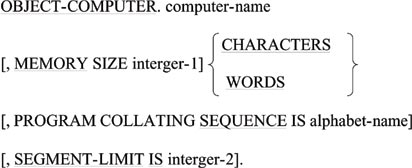
The computer name specifies a particular computer
on which the object program is to be executed.
The MEMORY SIZE is used to indicate the amount of
storage available to the object program. This clause
is also used in conjunction with the SORT verb.
The PROGRAM COLLATING SEQUENCE clause specifies the
collating sequence that is to be used to compare nonnumeric
data items. The alphabet name in this clause should
be defined in the SPECIAL-NAMES paragraph to specify
a collating sequence. If this clause is absent, the
machine’s own collating sequence called NATIVE,
is assumed.
The SEGMENT-LIMIT clause is used in most of the compilers
to indicate that the sections having segment number
less that the number specified in integer-2 should
be held in the permanent area of storage and should
not be transferred to and from the virtual memory.
All the entries in this paragraph are terminated using
period ( a dot). The following is an example of the
OBJECT-COMPUTER paragraph.
OBJECT-COMPUTER. THOSHIBA-SATELLITE.
MEMORY SIZE 8000 WORDS.
|
|
| |
|
| |
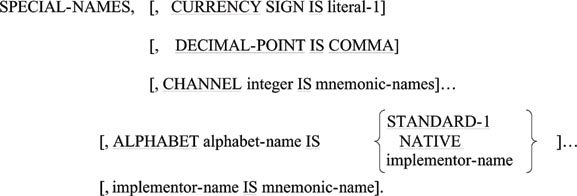
This paragraph is used to relate some hardware names
to user-specified mnemonic
names. This paragraph is optional in all compilers.
The following is the format of this
paragraph.
|
|
| |
|
|
| |
|
| |
This section contains information regarding files
to be used in the program. There are two paragraphs
in this section: FILE-CONTROL and I-O-CONTROL.
|
|
| |
|
| |
The
FILE-CONTROL paragraph names each file and identifies
the first medium through file control entries. The
simplified format of a file control entry is given
below.
SELECT
[OPTIONAL] file-name ASSIGN
TO hardware-name.
In general, a COBOL source program uses some files.
For each of these files, there must be a FILE-CONTROL
entry. This entry names the file and assigns a peripheral
device which holds that particular file. The file
names that appear in the SELECT clauses must be unique
and all these files must be described in DATA DIVISION.
The file name should be formed according to the rules
of data names.
The word OPTIONAL may be used only for input files.
When the object program is executed, the optional
files need not be present on every occasion. If the
optional clause is omitted for a particular file,
the file must be present during the execution of the
program. If the file is absent, an execution error
will occur. On the other hand, if an optional file
is absent, any attempt to open the file for reading
will not result in an error. But the absent file will
be considered to be an empty file which means that
the file does not contain any record.
The assign clause assigns a particular physical peripheral
device name to a file. The physical peripheral device
names are machine-dependent. We shall use the device
names READER, PRINTER, TAPE and DISK to mean card
reader, line printer, magnetic tape and magnetic disk
device respectively.
An example of the FILE-CONTROL paragraph is given
below:
|
|
| |
| FILE-CONTROL. |
| |
SELECT
STU-FILE ASSIGN TO DISK. |
| |
SELECT
REPORT-FILE ASSIGN TO PRINTER. |
|
|
| |
This paragraph indicates that there are two files:
STU-FILE and REPORT-FILE. The file named STU-FILE
is a disk file, while the other is a report file to
be printed on a line printer.
|
|
| |
|
|
| |
|
|
| |
|
|
| |
|
|
| |
|
|